AI Models
What Is Mistral Large 4? A Practical Guide to the Multimodal Model
What is Mistral Large 4? This practical guide explains its MoE architecture, multimodal vision, long context, tool calling, structured output, API model ID, pricing notes, and limitations.

slug: what-is-mistral-large-4 locale: en title: 'What Is Mistral Large 4? A Practical Guide to the Multimodal Model' seo_title: 'What Is Mistral Large 4? Features, Context, API, and Use Cases' description: 'What is Mistral Large 4? This practical guide explains its MoE architecture, multimodal vision, long context, tool calling, structured output, API model ID, pricing notes, and limitations.' category: AI Models tags:
- Mistral Large 4
- multimodal AI
- Mixture of Experts
- long context AI
- AI API keywords:
- what is Mistral Large 4
- Mistral Large 4 features
- Mistral Large 4 API
- Mistral Large 4 context window
- Mistral Large 4 multimodal image: https://file.mistrallarge4.com/uploads/what-is-mistral-large-4/mistral-large-4-cover.png cover_image: https://file.mistrallarge4.com/uploads/what-is-mistral-large-4/mistral-large-4-cover.png og_image: https://file.mistrallarge4.com/uploads/what-is-mistral-large-4/mistral-large-4-cover.png canonical: https://mistrallarge4.com/blog/what-is-mistral-large-4 alternate_zh: https://mistrallarge4.com/zh/blog/what-is-mistral-large-4 toc: true schema_type: BlogPosting author: Mistral Large 4 editorial team published_at: 2026-10-07 updated_at: 2026-10-07
What Is Mistral Large 4? A Practical Guide to the Multimodal Model
Short answer: Mistral Large 4 is Mistral AI’s public-preview, open-weight, general-purpose multimodal model. It combines text and image understanding with a granular Mixture-of-Experts (MoE) architecture, a very large context window, function calling, structured outputs, document question answering, batch processing, and agent-oriented tools. The official model card describes 52 billion active parameters, 1.05 trillion total parameters, and a 1.6 billion-parameter vision encoder.
The important distinction is between the model’s capability and the limits of a particular service. The official Mistral model card currently advertises a 1M-token context window, while the public API guide on this site documents a 524,288-token model context and up to 262,144 output tokens for the mistral-large-4-0 deployment. In production, use the limits exposed by the endpoint you call rather than assuming that every host offers the maximum model-card figure.
If you want to evaluate the model before integrating it, try Mistral Large 4 in the online playground. This guide explains what the model is, where it fits, how to use it, and where its boundaries matter.
Table of contents
- What Mistral Large 4 is
- The architecture: a granular Mixture of Experts
- Multimodal input: text plus images
- Long context and the practical limit
- Tools, agents, and structured output
- What Mistral Large 4 is good at
- Where it is not the right tool
- How to prompt it well
- A minimal API example
- Access, pricing, and deployment choices
- Frequently asked questions
- The bottom line
What Mistral Large 4 is
Mistral Large 4 is designed as a broad, high-capability model rather than a narrow specialist. “General-purpose” means it can handle writing, analysis, coding, document work, visual question answering, tool use, and agent workflows through the same model family. “Multimodal” means the request can contain more than plain text; the documented interface accepts images as well as text.
The model is listed as Mistral Large 4, with the model card identifying the release as mistral-large-4. API integrations may expose the versioned identifier mistral-large-4-0. Always check the platform’s model list or documentation for the exact string required by the endpoint. On this site, the public API and playground use mistral-large-4-0.
The release is marked Public Preview. That label matters: preview models can change in performance, pricing, limits, routing, or availability. Treat the model as ready for evaluation and controlled production experiments, but add monitoring and keep a fallback model for business-critical paths.
The model card’s core specification is compact:
| Capability | What it means in practice |
|---|---|
| 52B active parameters | The approximate amount of model capacity used for a given token path. |
| 1.05T total parameters | The total parameter pool across the sparse expert system. |
| 1.6B vision encoder | A dedicated visual front end for interpreting image inputs. |
| Text and image input | One request can combine written instructions with visual context. |
| Public Preview | Test behavior and limits against the current release before committing to assumptions. |
These numbers are not a promise that every request will be fast or that every task will benefit from the largest configuration. They explain the shape of the system: a large sparse model that selectively activates capacity and a vision encoder that turns images into information the language model can reason over.

The architecture: a granular Mixture of Experts
An MoE model contains multiple expert subnetworks instead of sending every token through one dense block. A router chooses which experts should process each token, then combines their results. In a granular MoE, the experts are split into smaller units, giving the router more choices about how to allocate computation.
The useful intuition is not “one trillion parameters on every request.” It is “a very large pool of specialized capacity, with a smaller active path for each token.” Mistral Large 4’s 1.05T total and 52B active figures describe that sparse design. The active number is especially relevant to serving cost and latency, although real performance also depends on hardware, batching, sequence length, routing, quantization, and the provider’s infrastructure.
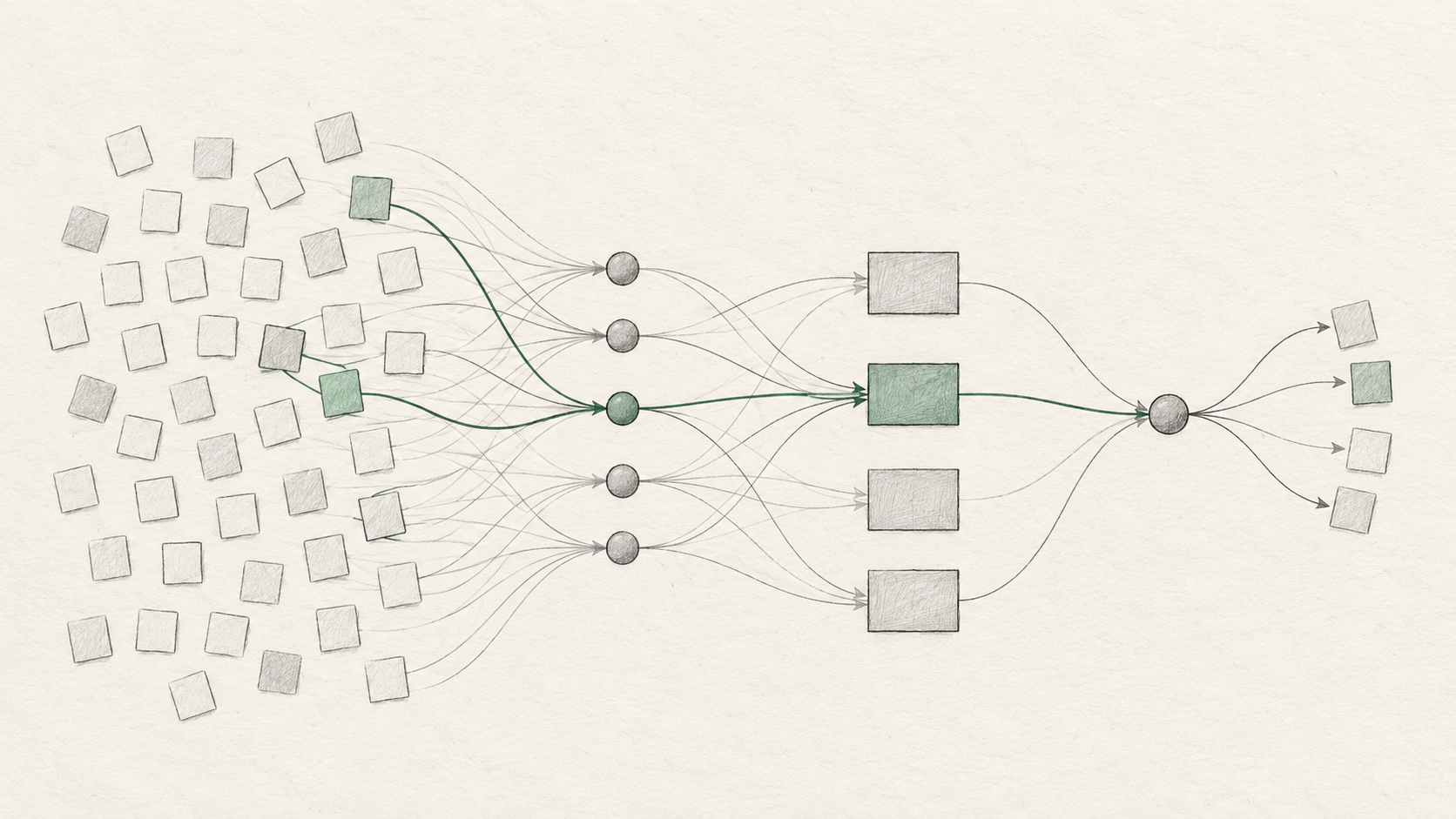
Why should an application developer care? Sparse routing can make a very capable model more practical to serve than a dense model with the same total parameter count. It can also let different parts of the network specialize in different patterns, such as code, prose, formal structure, or visual relationships. That does not mean the model has human-readable experts or that each expert has a fixed job; the specialization is learned and distributed.
There are also trade-offs. Routing can introduce uneven load, and long prompts can still be expensive because the system must read the input. A huge total parameter count does not remove the need for prompt budgeting, caching, batching, and sensible output limits. In other words, MoE is an efficiency and capacity strategy, not a shortcut around engineering discipline.
Multimodal input: text plus images
Mistral Large 4’s multimodal feature is most useful when the image is part of a reasoning task. Examples include:
- explaining a chart or diagram in plain language;
- extracting fields from a screenshot, receipt, slide, or form;
- reviewing a UI screenshot and listing visible usability issues;
- answering a question about a product photo or technical illustration;
- comparing two images against explicit criteria;
- combining a visual reference with a written specification.
The right mental model is “image understanding inside a language workflow,” not “an image generator.” The model analyzes the image and returns text or structured data. It does not replace a dedicated image generation model, and it should not be treated as a pixel-perfect OCR engine for regulated or high-volume document capture without validation.
The public guide for this deployment supports image URLs that are reachable over HTTP or HTTPS. Avoid embedding credentials in image URLs. For private images, use a short-lived signed URL or send the image through a trusted server-side flow that the provider supports. Keep the visual prompt explicit: say which region to inspect, what fields to extract, what uncertainty to report, and what format to return.
Video and audio are a separate boundary. The site’s API documentation states that this deployment accepts text and images, not video or audio content parts. If your application receives recordings, transcribe or sample them with an appropriate service first, then pass the resulting text or selected frames to Mistral Large 4.
Long context and the practical limit
Long context is one of the model’s most important product features. It allows a single task to include a large codebase excerpt, a long contract, many research notes, or a multi-step conversation without immediately collapsing everything into a short summary.
But “large context” is not the same as “perfect recall.” Retrieval quality can fall when the prompt contains many irrelevant sections. A model can technically accept a long document and still miss a small clause buried in the middle. High-value applications should combine long context with structure:
- Label documents, sections, dates, and sources.
- Ask for evidence or quoted spans when the answer must be auditable.
- Separate extraction from interpretation.
- Use a schema for fields that downstream software will consume.
- Set a finite output budget and handle truncation explicitly.

The current official model page lists 1M under context. The public site guide documents 524,288 tokens of model context and 262,144 maximum output tokens for the mistral-large-4-0 deployment. Those figures can coexist if they refer to different serving surfaces or release configurations, but an application should not guess. Check the model card and the endpoint documentation at the time of integration, then leave headroom for system messages, tool results, and safety instructions.
Also distinguish model limits from request limits. A playground may impose message counts, character limits, request-body limits, or a smaller output cap for reliability. The endpoint you use may apply its own rate limits and maximums. The practical limit is always the smallest limit in the full request path.
Tools, agents, and structured output
The model card lists function calling, structured outputs, document Q&A, chat completions, batching, agents and conversations, and built-in tools. Together, these features make Mistral Large 4 more than a text-in/text-out chatbot.
Function calling lets the model choose a declared function and provide arguments. Your application remains responsible for validating the arguments, authorizing the action, executing it, and returning a bounded result. Never treat a tool call as permission to access a database, send money, or change an account without server-side checks.
Structured output is useful when a response feeds a workflow. A JSON schema can turn a visual inspection into fields such as issue_type, severity, evidence, and confidence. Validate the returned object, handle missing fields, and log the schema version. JSON mode helps with syntax, but a schema plus validation is stronger than asking the model to “return valid JSON.”
Agent workflows use a loop: the model interprets the goal, chooses a tool, observes the result, and decides what to do next. Give the loop a maximum number of steps, a timeout, a clear stop condition, and a small tool surface. Agent quality usually improves more from good tool descriptions and observable state than from adding more tools.

What Mistral Large 4 is good at
Mistral Large 4 is a strong candidate when a task combines several of these properties:
1. Long-form analysis with source material
It can read a large set of notes or documents and produce a synthesis, comparison, or decision memo. Ask it to preserve source boundaries and identify uncertainty rather than blending every claim into one voice.
2. Image-grounded reasoning
Screenshots, diagrams, charts, and forms can be placed next to a written instruction. This is valuable for support triage, UI review, research synthesis, and document workflows where the image changes the answer.
3. Coding and technical explanation
Use it to explain an unfamiliar module, propose a refactor, review an error trace, or convert a natural-language requirement into a typed plan. For production code, pair the model with tests, a sandbox, and a human review step.
4. Tool-assisted applications
Function calling and structured output make it suitable for assistants that search internal information, create tickets, classify requests, or prepare a draft action for approval. The model can decide what to ask for; your application should decide what is allowed.
5. Batch and repeatable processing
If you have many independent documents or prompts, batch support can simplify throughput planning. Measure end-to-end latency, retries, token cost, and error rates rather than comparing only a single interactive response.
Where it is not the right tool
Mistral Large 4 is broad, but a larger model is not automatically the best choice. Choose a smaller or specialized model when the task is simple classification at very high volume, strict low latency, or low-cost autocomplete. Use an OCR-specific system when you need precise bounding boxes, layout recovery, or audited document extraction. Use an audio or video model when the input is a recording rather than text or still images.
You should also avoid treating the model as a live database. Its response can be fluent and still be wrong, outdated, or overconfident. Give it current source material, request citations or evidence, and add deterministic checks for dates, identifiers, totals, policy rules, and safety-sensitive decisions.
How to prompt it well
A reliable prompt usually has five parts:
- Role and task: “You are reviewing a product screenshot for accessibility issues.”
- Context: explain who will use the result and what the image or documents represent.
- Criteria: define what counts as an issue, including priority levels.
- Output contract: request a schema, table, or short set of labeled sections.
- Uncertainty rule: instruct the model to say “not visible” or “insufficient evidence” instead of guessing.
For image tasks, specify the region and the desired evidence. For long documents, name the source and section in the output. For agents, describe each tool’s purpose, required arguments, side effects, and failure behavior. Start with a low output limit, then increase it only when the task truly needs a longer answer.
You can read the API and prompt guide on Mistral Large 4 for the deployment-specific request format and playground limits.
A minimal API example
The following example shows the shape of a multimodal request. It sends text plus a publicly reachable image URL and asks for a small JSON object. The exact response-format options can vary by provider, so validate against the current endpoint documentation.
const response = await fetch('https://api.mistral.ai/v1/chat/completions', {
  method: 'POST',
  headers: {
    Authorization: `Bearer ${process.env.MISTRAL_API_KEY}`,
    'Content-Type': 'application/json',
  },
  body: JSON.stringify({
    model: 'mistral-large-4-0',
    messages: [
      {
        role: 'user',
        content: [
          {
            type: 'text',
            text: [
              'Review this dashboard screenshot.',
              'Return the three most important usability issues.',
              'If a detail is not visible, say so instead of guessing.',
            ].join(' '),
          },
          {
            type: 'image_url',
            image_url: {
              url: 'https://example.com/dashboard.png',
            },
          },
        ],
      },
    ],
    response_format: { type: 'json_object' },
  }),
});

if (!response.ok) {
  throw new Error(`Mistral request failed: ${response.status}`);
}

const result = await response.json();
console.log(result.choices?.[0]?.message?.content);
For a production integration, keep the API key on your server, validate image URLs, set timeouts and retries, record the model ID, and handle finish_reason: length when the output budget is exhausted. If the returned JSON drives an action, parse it with a schema validator and reject unknown or unsafe arguments.

Access, pricing, and deployment choices
There are three practical ways to evaluate Mistral Large 4:
- Playground: useful for comparing prompts, images, output formats, and reasoning strategies interactively.
- Hosted API: useful when you need a stable request path, usage tracking, tool calls, and application integration.
- A compatible serving environment: potentially useful for organizations that need more control, but only after confirming weight availability, license terms, hardware requirements, and operational support.
The official model page currently displays launch pricing of approximately $0.68 per million input tokens, $0.07 per million cached input tokens, and $2.09 per million output tokens, alongside higher crossed-out prices. The changelog describes a limited launch discount. Treat those figures as time-sensitive: pricing, discounts, and regional availability can change. Check the current pricing page before estimating a budget.
Open-weight is also worth interpreting carefully. It signals a model family intended to make weights available under stated terms, but it does not mean that self-hosting is automatically available on launch day or that the hosted API has no restrictions. Verify the official weights, license, hardware requirements, and safety obligations before planning an on-premise deployment.
For data-sensitive workflows, ask where inference runs, how requests are retained, whether images are logged, and how provider-level deletion works. A multimodal model expands the privacy surface because screenshots and documents can contain personal or confidential information.
Frequently asked questions
Is Mistral Large 4 open source?
The official model card describes Mistral Large 4 as open-weight. Open-weight and open source are not interchangeable legal claims; review the current weight release and license before redistributing or self-hosting it.
What is the Mistral Large 4 model ID?
The model card uses mistral-large-4, while this site’s public playground and API guide use mistral-large-4-0. Use the identifier required by the endpoint you are calling and do not assume aliases are universal.
Does Mistral Large 4 understand images?
Yes. It is a multimodal model with a 1.6B vision encoder, and the documented deployment accepts text and image input. Use it for visual question answering, screenshot review, chart explanation, and image-grounded extraction. Validate important facts against the source image.
Does it accept video or audio?
The public deployment documented on this site accepts text and images, not video or audio content parts. Transcribe audio or sample video frames with a suitable preprocessing pipeline before calling the model.
Is the context window 512K or 1M tokens?
The official model page currently lists a 1M context window. The public site guide documents 524,288 tokens for the mistral-large-4-0 deployment. The effective limit depends on the serving surface, so check the endpoint you use and leave room for system prompts, tool results, and output.
Can I use it for autonomous agents?
Yes, its listed features include function calling, agents and conversations, and built-in tools. Use a bounded tool loop with authentication, argument validation, timeouts, audit logs, and an explicit human-approval step for consequential actions.
The bottom line
Mistral Large 4 is best understood as a large, sparse, general-purpose model for applications that need more than chat: long documents, images, code, structured data, and tools in one workflow. Its headline numbers—52B active parameters, 1.05T total parameters, and a 1.6B vision encoder—explain why it is positioned as a high-capability model, but they do not replace task-level testing.
Start with a representative evaluation set: short prompts, long documents, screenshots, structured extraction, tool calls, and failure cases. Measure accuracy, groundedness, latency, cost, and refusal behavior. Then choose the smallest context, output budget, and model surface that meets the requirement. That practical loop is more reliable than choosing a model from parameter count alone.
Sources
- Mistral Large 4 model card — architecture, modalities, context, features, and current model-page pricing.
- Mistral AI changelog — public-preview release status and launch pricing note.
- Mistral Large 4 playground and API guide — deployment-specific model ID, request limits, and multimodal request guidance.